How to enable email service
SMTP Server Configuration
Click the profile photo and go to Platform Mgt > Integration > Basics:
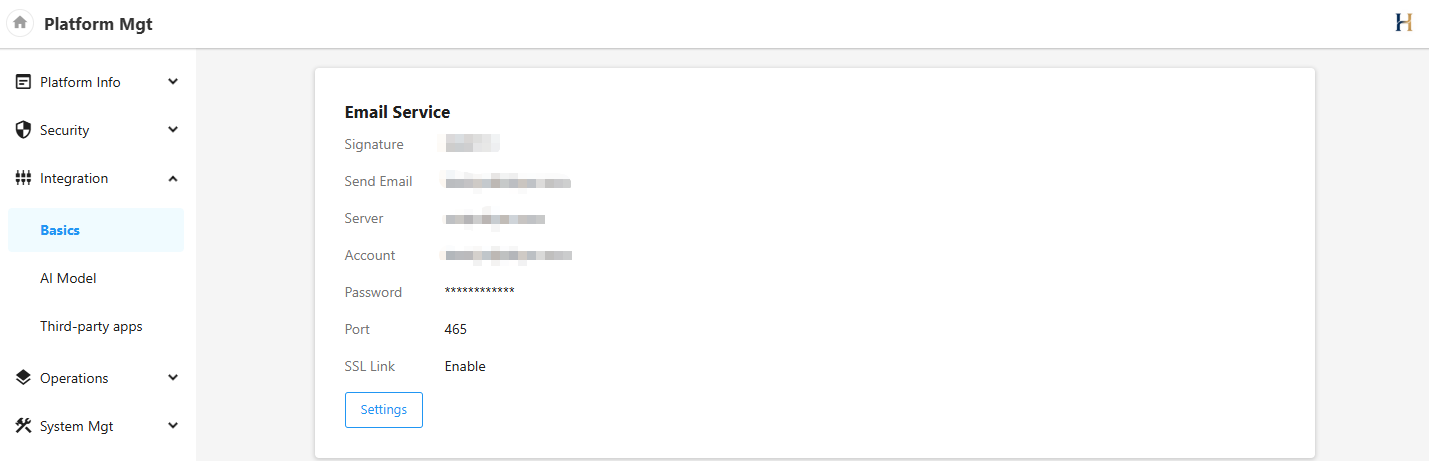
Configuration for Common SMTP Server
Note: If using port 25, some servers may require unblocking port 25.Tencent Exmail
The administrator needs to enable POP/SMTP/IMAP for configuring email sending. For more details, visit https://work.weixin.qq.com/help?person_id=1&doc_id=277&helpType=exmail.
Use the Exmail account and password to configure the email service. The email and account should be the same.
| Server | Port (non-SSL) | Port (SSL) |
|---|---|---|
| smtp.exmail.qq.com | 25 or 587 | 465 |
Alibaba Cloud Exmail
The administrator needs to enable POP/SMTP/IMAP for configuring email sending.
Use the Exmail account and password to configure the email service. The email and account should be the same.
| Server | Port (non-SSL) | Port (SSL) |
|---|---|---|
| smtp.mxhichina.com | 25 or 587 | 465 |
Alibaba Cloud Mail
Enable POP/SMTP/IMAP for configuring email sending.
Use the email account and password to configure the email service. The email and account should be the same.
| Server | Port (non-SSL) | Port (SSL) |
|---|---|---|
| smtp.aliyun.com | 25 | 465 |
Tencent QQ Mail
Enable POP/SMTP/IMAP for configuring email sending.
Use the email account and authorization code (not email password). to configure the email service. The email and account should be the same.
| Server | Port (non-SSL) | Port (SSL) |
|---|---|---|
| smtp.qq.com | 25 or 587 | 465 |
189 Mail
Enable POP/SMTP/IMAP for configuring email sending.
Use the email account and password to configure the email service. The email and account should be the same.
| Server | Port (non-SSL) | Port (SSL) |
|---|---|---|
| smtp.189.cn | 25 or 587 | 465 |
163 Mail
Enable POP/SMTP/IMAP for configuring email sending.
Use the email account (only the part before "@") and authorization code (not email password). to configure the email service. The email and account should be the same.
| Server | Port (non-SSL) | Port (SSL) |
|---|---|---|
| smtp.163.com | 25 | 465 |
If the email sending fails, please check the connectivity using the following commands.
docker exec -it $(docker ps | grep -E 'mingdaoyun-community|mingdaoyun-hap' | awk '{print $1}') bash -c 'nc -vz server port'
Self Integration
Additionally, it supports configuring a Webhook URL to receive emails and then implement email sending independently.
-
Create a configuration file
appextensions.jsonFor example:
/data/mingdao/script/volume/email/appextensions.json:{"WebhookUrl": "https://api.yourdomain.com/email/webhook","WebhookHeaders": {}}Configuration Parameters:
- WebhookUrl: Required, the API endpoint for receiving email messages.
- WebhookHeaders: Optional, custom request headers for authentication and other purposes.
-
Message Body Specification
HAP sends JSON data to
WebhookUrlviaPOSTwithapplication/jsonformat. The message body format is as follows:{"ToEmails": ["email1","email2"],"ReplyToEmails": ["email1","email2"],"CcEmails": ["email1","email2"],"BccEmails": ["email1","email2"],"Signature": "Signature","Subject": "Email Subject","Body": "Email Body","Attachments": { "Attachment Name 1": "Download Link 1", "Attachment Name 2": "Download Link 2" }}Field Descriptions:
ToEmails: List of recipient emailsReplyToEmails: List of emails to reply to by defaultCcEmails: List of CC emailsBccEmails: List of BCC emailsSignature: Sender's nameBody: Content in HTML formatAttachments: Mapping of attachment names to download URLs
-
Mount the configuration file
appextensions.jsonto the microservice container at/usr/local/MDPrivateDeployment/email/appextensions.json.Add the following to the
docker-compose.yamlfile under theappservice'svolumes:- ./volume/email/appextensions.json:/usr/local/MDPrivateDeployment/email/appextensions.json -
Restart the service