How to extend the execution environment of code blocks
By default, in HAP the execution environment for code blocks is Node.js (10.18) and Python (3.6). Starting from v5.1, HAP will support the extension of more execution environment.
Available Images
The following code block execution environment images are available. The full image address is registry.cn-hangzhou.aliyuncs.com/mdpublic/mingdaoyun-command:<image-tag>:
| Image Tag | Node.js Version | Python Version |
|---|---|---|
node1018-python36 (default) | 10.18 | 3.6 |
node2011-python312 | 20.11 | 3.12 |
node24-python315 | 24 | 3.15 |
Considering compatibility issues, it supports switching between multiple versions or completely switching to the new version.
Extending Dependencies
For extending dependencies of code blocks, see how to extend the dependencies of code blocks. Adjust the paths according to the selected image:
| Image Tag | Python Dependency Path in the Container | Node.js Dependency Path in the Container |
|---|---|---|
node1018-python36 | /usr/local/lib/python3.6/site-packages/ | /usr/local/node-10.18.0/lib/node_modules/ |
node2011-python312 | /usr/local/lib/python3.12/site-packages/ | /usr/local/node-20.11/lib/node_modules/ |
node24-python315 | /usr/local/lib/python3.15/site-packages/ | /usr/local/node-24/lib/node_modules/ |
Also adjust the runtime paths in installation commands. Use separate host mount directories for dependencies of different versions.
Execution Environment Configuration
node2011-python312 and node24-python315 use the same configuration steps and support both modes:
- Multi-version Mode: Keep the default environment and add other versions as needed. All three versions can coexist.
- New Version: Replace the image of the
commandservice to use the selected version for all code blocks.
In multi-version mode, use the following service and extension settings:
| Service Name | Image Tag | Extension Configuration Index | nodeVersion | pythonVersion |
|---|---|---|---|---|
command (default) | node1018-python36 | Not required | — | — |
commandv2 | node2011-python312 | [0] | 20.11 | 3.12 |
commandv3 | node24-python315 | [1] | 24 | 3.15 |
Use static://<service-name>:9098 as the service address in the extension configuration. Each index must be unique.
The following examples use the node2011-python312 image.
- Multi-version Mode
- New Version
-
Download the image (Offline Package)
docker pull registry.cn-hangzhou.aliyuncs.com/mdpublic/mingdaoyun-command:node2011-python312 -
Modify the configuration file by adding the following configuration
commandv2:image: registry.cn-hangzhou.aliyuncs.com/mdpublic/mingdaoyun-command:node2011-python312 -
Create a configuration file for extending code block services, such as:
/data/mingdao/script/volume/workflow/application-www-ext.properties, with the following content:md.grpc.client.MDCommandService[0].address=static://commandv2:9098md.grpc.client.MDCommandService[0].nodeVersion=20.11md.grpc.client.MDCommandService[0].pythonVersion=3.12 -
Mount the configuration file by adding the following configuration to the volumes of the app service:
volumes:- ./volume/workflow/application-www-ext.properties:/usr/local/MDPrivateDeployment/workflow/application-www-ext.properties- ./volume/workflow/application-www-ext.properties:/usr/local/MDPrivateDeployment/workflowconsumer/application-www-ext.properties- ./volume/workflow/application-www-ext.properties:/usr/local/MDPrivateDeployment/workflowintegration/application-www-ext.properties- ./volume/workflow/application-www-ext.properties:/usr/local/MDPrivateDeployment/workflowplugin/application-www-ext.properties -
After restarting the service, you can select the Node.js 20.11 and Python 3.12 execution environments in code blocks, as shown below:
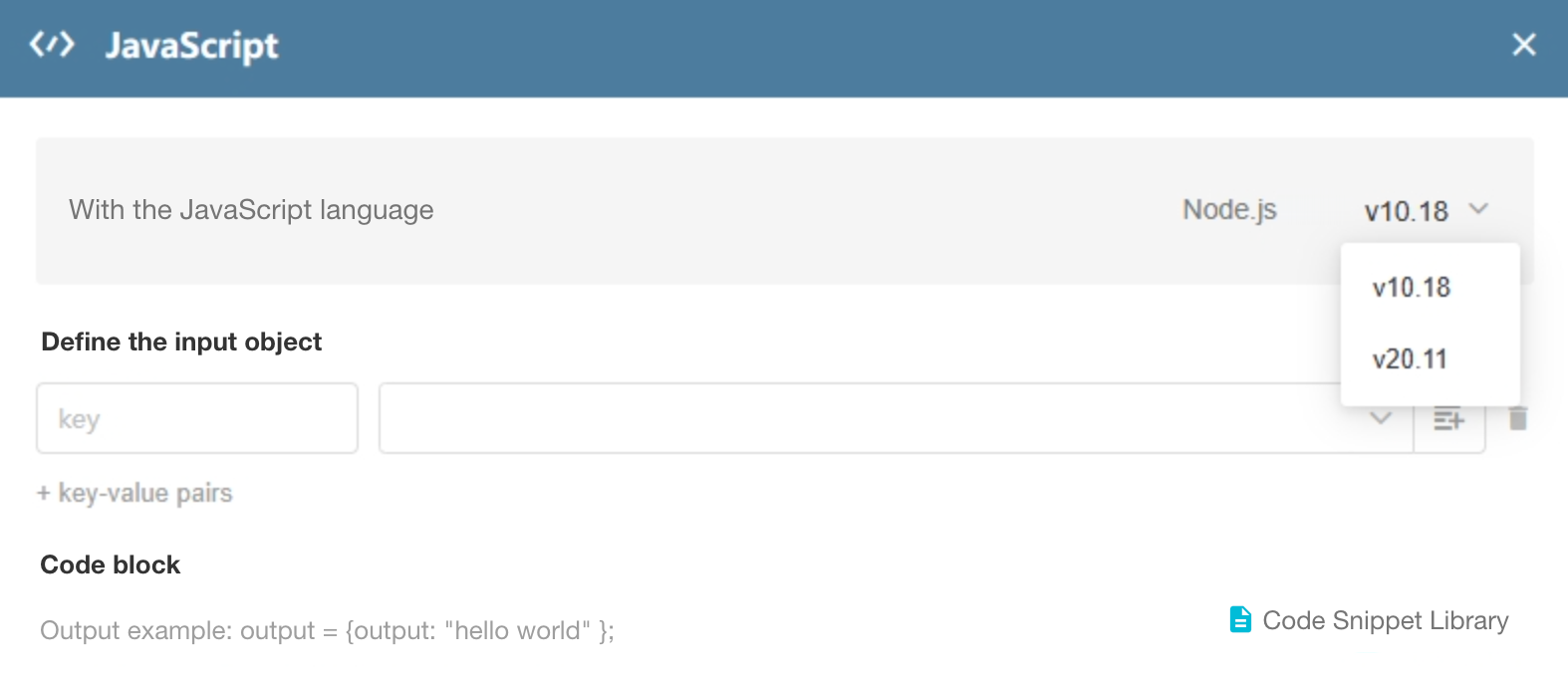
Note: In this mode, there may be compatibility issues with history code blocks. If the risk is uncontrollable, it is not recommended to switch directly.
-
Download the mirror (Offline Package)
docker pull registry.cn-hangzhou.aliyuncs.com/mdpublic/mingdaoyun-command:node2011-python312 -
Modify the configuration file by changing the version of the mirror corresponding to the command service to
node2011-python312 -
Restart the service